How to Recover Your Deleted Mac Files

Switching from Windows to Mac benefits users in many ways and one of the biggest advantages is less virus contamination and reduced file system corruption. Though virus infection and file system corruption play a big role in data loss faced by any computer user, they are not the only reason. Accidental deletion of a file while cleaning up cluttered desktop or hard drive and clearing the ‘Trash’ without viewing its contents are some other reasons that cause Mac data loss.

Therefore, to overcome data loss occurred due to any reason, it is recommended to maintain the backup of your valuable files. However, if you do not have latest backup of your data, then too you should not worry as there are professional Mac file recovery tools. These tools are efficient enough for recovering your lost, deleted, and formatted files. However, you may think that how? How a file recovery tool for Mac can recover all the files that are not present?

Well, this is the biggest misconception of most of the computer users that deleted file (here file is representing both data and folder) are lost from their computer’s hard drive for ever. Deletion not exactly deletes a file instead it removes the entry of the file in the index table, maintained by the file system. The index entry is used by the Operating System (OS) to access the file hence its deletion makes the file unavailable. On the other hand, the deleted file remains at its original location physically intact.

However, due to the unavailability of the indexes of deleted files, the OS marks the space occupied by them as free to use. Therefore, if you save a new file on your affected hard drive, then it is quite possible that the OS saves it at the location of the deleted file and overwrites it. This clearly indicates that the index file is the only reason that misleads your OS about the deleted file. Therefore, if you use a software that bypasses the index entry and accesses data directly from the hard drive, then you can definitely recover deleted files. And, this is what a Mac file recovery tool does.

It leaves the index entries and accesses all the data on the hard drive that does not have index. During recovery with file recovery tool, you may also find that you get some months or even years of lost file. This is because these files are not overwritten till day; however, the chances of recovery of very old files are very less. Therefore, if you have lost some of your precious files, then Mac file recovery software would be a better option for you. But to perform successful recovery, it is suggested to stop using your affected hard drive until the recovery software done with its job.

Risks While Modifying a Volume in Mac

Partitioning a hard drive in several volumes of similar or different sizes during operating system installation is not a difficult task to perform. However, you do not need to worry if you did not partition your hard drive in slew volumes, as Mac OS X allows you to create a new one and delete or resize Mac volume through a built-in disk management tool i.e. Disk Utility, whenever required. You can find it in Applications-> Utilities-> Disk Utility.

Risks during modifying a volume

Disk Utility is one of the best tools embedded in Mac OS X that facilitates end-user to perform several system related tasks easily. However, there are several risk factors, which you need to be careful about while performing any of the above mentioned operations on your Mac volumes. A few known possible vulnerabilities are discussed below:

Volume Inaccessibility due to Volume Header Corruption

Every Mac volume has a header (1KB in size) associated with it that stores overall information about respective volume. This header works as an entry in the Apple Partition Map indexing. In any case, if this volume header of a particular volume gets corrupt, then the respective volume as well as the data stored in it becomes inaccessible, as Mac is not able to detect that volume.

File System Corruption

Mac OS X employs an intelligent file system (HFS, HFSX, HFS+, and HFS wrapper) to format its volumes. Several internal and external factors, such as software and hardware, forced shutdown, power failure etc. affects these file systems. Modifying a Mac volume is also among the factors affecting these file systems that may cause corruption.

Partition Map Scheme

When you open Disk Utility and select hard drive in the left-pane, it displays certain information in the bottom-pane. Partition Map Scheme is one of this information that displays the partition scheme employed to partition that hard drive. You can modify a volume only if it displays GUID Partition Table (GPT). However, you cannot modify a volume if it is Apple Partition Map (APM) or Master Boot Record (MBR). In case, if you try to do it, it may also affect the logical structure of the respective volume.

Risk while Modifying Boot Volume of Mac

If you try to modify the boot volume of your Mac, you may suffer a crash, which may cause complete inaccessibility. Therefore, you need your Mac OS X installation disc if you wish to modify your boot volume.

You need to insert the disc and restart your Mac. Press and hold “Option” and “R” keys during startup to boot in Recovery mode. Go to Disk Utility after it starts up and select “Partition” tab in the right-pane. Click boot volume and drag it through its border to modify it. In case, if you are going to shrink it, you can utilize the unallocated space to create a new volume or enlarge any existing one.

However, always keep a backup of your data to avoid any sort of risk leading to data inaccessibility or corruption.

How to Troubleshoot ‘Kernel Panic’ Issue in Lion

Like ‘Blue Screen of Death’ in Windows, you may come across “You need to restart your computer. Hold down the power button for several seconds or press the Restart button.” alert in your Mac OS X 10.7 – Lion. This issue is typically called ‘Kernel Panic’ in Mac OS X. ‘Kernel Panic’ is an action taken by OS X when it detects internal fatal errors that it cannot rectify. However, if restarting Mac solves your problem, then there is nothing to worry, but if you get this error or alert repeatedly, then you need to troubleshoot it manually.

Some specific causes of ‘Kernel Panic’ errors are:

  • Corruption in the hard drive

  • Presence of bad sectors in your hard drive

  • Directory corruption is another cause that renders ‘Kernel Panic’

  • Missing system folder or files or incorrect permissions are also responsible for the same

  • Badly installed software or hardware or combination of these two is another prominent cause for this alert

  • Inadequate RAM or insufficient space on your hard drive also causes this error

To avoid ‘Kernel Panic’, it is suggested to install the latest updates of all software of your Mac until the Software Update says ‘Your software is up to date’. However, if you get the ‘Kernel Panic’ error after installing all software updates or a week later after software update, then issue is troublesome and you need to take some action. You can follow below mentioned steps to rectify this alert/error:

  • Turn off your Mac by holding down the power button for several seconds.

  • Now turn your Mac on.

  • During startup, hold down the ‘SHIFT’ key to start your machine in ‘Safe Mode’ through ‘Safe Boot’ process.

  • If your Mac starts normally after ‘Safe Boot’ without giving ‘Kernel Panic’ message, then restart your machine by choosing ‘Apple (menu) >> Restart..’ and let it start up normally.

  • However, if your Mac throws another ‘Kernel Panic’ issue during ‘Safe Boot’ start, then reinstallation of hard drive can solve your problem.

Since reinstallation resets the file system of your Mac OS X Lion, thus it rectifies all the OS X related issues, such as ‘Kernel Panic’. However, hard drive reinstallation causes data loss that can be recovered by recent backup, but if you do not have updated backup, then use of a professional Mac data recovery software is recommended.

Reliable Data Recovery Software Mac recovers all your data that is lost due to hard drive formatting, or any other reason like accidental deletion.

Shedding Light on Two Possible Data Loss Scenarios in Mac

Hard drive technology is continuously evolving and taking a turn for the better. On the flip side, even modern hard drives are not exempt from failures and the risk of data loss. This manifests itself in that we cannot overly depend on these data storage devices for keeping our business data or personal information safe. Mac OS X drives also become susceptible to corruption with time and in the worst cases, end up with boot failures. OS X enables you to do some troubleshooting on your part to save your precious data stored on the hard drive. Lets us delve deeper and discuss two possible situations a Mac user frequently bumps into:

If Your Mac Boots Successfully

If your Mac is able to boot properly, the first paramount task is to back up your entire hard drive. Once you create a backup successfully, start with the troubleshooting process.

If you do not hear any clicking noises, then the drive is probably not failing. If your startup disk has a corrupt directory, then Disk Utility can help you repair the damage. Apple’s Disk Utility cannot resolve issues other than directory corruption. You can run Disk Utility to check your volume’s health and correct any existing or potential errors. To do so, follow the given procedure:

  • Navigate to ‘Applications\Utilities’ and open Disk Utility.
  • Choose the Mac’s boot volume, select the ‘First Aid’ tab, and then click ‘Verify Disk’ or ‘Repair Disk’.

Disk Utility also allows repairing permissions of System files and folders on your startup disk. This can resolve an abundance of errors on your Mac.

If Your Mac Doesn’t Boot

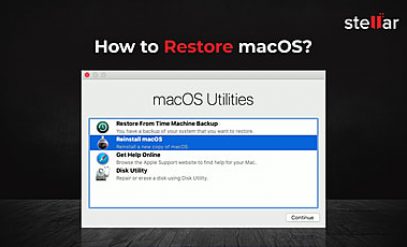
In case your Mac has boot issues and does not start up, plug out the troubled hard drive from your Mac and attach it to a test system to carry out diagnostics tests. If you are using a new Mac that came with a Lion Recovery partition, you can boot your system into Recovery Mode. You can switch to Recovery Mode by pressing the Command and ‘R’ keys together at startup. Once you are running in Recovery Mode, you will be displayed a set of Mac OS X utilities. With these set of tools, you can run Disk Utility, reinstall OS X, or restore from Time Machine backups.

If you fail to troubleshoot and fix your Mac, take help of professional Mac data recovery tools. They may not cost you a pretty penny, but recover almost all of your mission-critical data stored on the OS X drive. Further, they are compatible with the latest Mac OS X 10.8 Mountain Lion.

A Closer Look at ‘First Aid’ Option of Mac ‘Disk Utility’

Mac is a robust Operating System that rarely crashes, but it is always recommended to check your machine time to time for file system errors and disk permission inconsistencies. For this, Mac OS X provides the ‘First Aid’ feature in its useful utility; that is ‘Disk Utility’. With creating, erasing, and formatting partitions on your hard drive, the ‘Disk Utility’ also lets you verify your hard drive and disk permissions and repair the problems, if found.

For analyzing and fixing problems related to your hard drive volumes and directories, the ‘First Aid’ feature of disk utility provides ‘Verify Disk’ and ‘Repair Disk’ options. On the other hand, for analyzing the disk permissions and then repairing them, the ‘First Aid’ facilitates ‘Verify Disk Permissions’ and ‘Repair Disk Permissions’ features. Let us discuss about these features of ‘First Aid’ utility in detail:

  • Repair Disk Permissions: Permissions are basically flags that are set for each and every item present in Mac OS X file system and are set when these files and applications are installed. These flags define whether an item can be written to, read over, or executed. Verify and repair permissions feature of ‘Disk Utility’ verify and reset the permissions of Mac system related files and folders only. The point to be noted here is; this feature repairs permissions of Apple oriented files and applications and not the permissions of any third-party software installed on your machine and is available for volumes on which Mac OS X is installed.
  • Repair Disk: Though this feature you can check and repair common issues related to your hard drive directory or drive volumes. Open ‘Disk Utility’ by going through ‘Applications >> Utilities >> Disk Utility’ and from there click the tab ‘First Aid’ to see the options for verification and repairing of disk. After selecting the ‘First Aid’ tab, select the hard drive partition that you want to verify, and click ‘Verify Disk’ button. Upon completion of this verification process, you will get a list of problems, if found any, and then upon clicking ‘Repair Disk’ button you can resolve these problems. However, you cannot repair your boot drive or startup disk with ‘Repair Disk’. For the repairing of issues that found in startup disk, you have to use your Mac OS X installation disk.

Though this feature of ‘Disk Utility’ resolves large number of Mac hard drive corruption issues related to problems in the directory, but it fails to fix sever directory corruption issues. For such cases, use of a professional non-Apple utility to recover Mac data is recommended. Reliable data recovery software also comes with system startup disc that allows you to start your Mac machine and access your data when your Mac OS X fails to boot.

Requisites to Keep Your Mac from Failing and Maintain Its Top Form

A little housekeeping or maintenance always helps to keep threats and vulnerabilities at arm’s length. This is perhaps a rule in the computing world. You will never find out when your Mac hard drive needs a replacement or you are screwed over those mixed-up menus and sudden crashes that almost go unexplained. An easy way to ward off disasters is to understand all potential risks to your Mac and put some effort to keep it in top form. The two must-follow maintenance tips are given below:

Verify Preferences

Preferences often become the reason for unexpected crashes and other undesired results, including menu corruption, issues with several applications, and more. This occurs due to corruption of application preference files. Deleting these files will have you lose all your custom preferences at once. Initially, you need to verify these files for corruption.

OS X stores all preference information in ‘.plist’ files. The ‘.plist’ files contain information in XML format. If these files are not in valid XML layout, then they are possibly corrupt. If you are running OS X 10.2 or later, you can verify your preference files by running the Unix’s ‘plutil’ utility at the Terminal as follows:

sudo plutil -s ~/Library/ Preferences/*.plist

You may need to provide a password to run the Terminal command. The ‘-s’ option won’t show any output for a successful test. When you use ‘/Library/Preferences’ as location, you can scan through top-level system preferences.

Repair Permissions

OS X controls user access to programs and folders through permissions. If these permissions get modified accidentally, you will face problems when accessing folders or running applications. The common signs of modified or corrupt permissions include inability to save files, launch applications, or change a program’s preferences.

Permissions on system files and folders may go bad, if you install something that includes system-level components or when you perform OS updates. You can easily repair corrupt permissions using Apple’s Disk Utility. The ‘Repair Disk Permissions’ feature of Disk Utility allows you to fix permissions on all Apple-originated objects. The overall time taken by this process may vary depending on the size of your startup disk.

In case you are unable to prevent OS X disk corruption, you may run the risk of severe data loss. In order to recover all your seemingly lost data from a corrupt Mac hard drive, you should take help of professional Mac data recovery software. Using these tools, you can safely restore Mac volumes and get all your lost data absolutely intact.

No More Startup Issues with Mac OS X

Apple has revamped its Disk Utility techniques, in order to fix and avoid abnormal PC startups. Therefore, if you are a Mac OS X user, you no more need to worry about such scenarios. If we see, Mac OS X has two errors supervising and handling mechanisms i.e. Disk Utility and fsck. Their major function is to detect and resolve the ongoing as well as possible issues in the file system of the OS. These issues may vary in different OS versions.

Causes of Errors

These file system issues may arise due to several reasons, such as abrupt power failure, forcibly system shutdown, sudden restart etc. Such interrupts cause file system issues and may fully corrupt it. In such scenarios, you can recover Mac data with the help of advanced data recovery tools.

Error Indications

You need to check the OS version of your PC and note the error indications accordingly. Therefore, if you are running an OS X 10.4 or later and facing any of the following errors, it is advised to use Disk Utility to check and resolve the file system errors: The PC does not fully startup and shows an error i.e.

file system dirty, run fsck.

In addition, a command line interface appears indicating some input is required. In such scenario, you need to quit the Disk Utility and run fsck, which is a command line utility. The other indication may be that your Mac starts but does not go up either to log in window or to Desktop.

Resolutions

You can try some of the resolutions mentioned below to get rid of the erroneous situation.

  • Boot in Safe Mode: Those who are running a Mac OS X 10.2 or later versions, are advised to restart their Mac in safe mode. While booting in safe mode, the system performs an auto checkup and repairs the file system. Those who are running an earlier version of Mac OS X will see the safe mode with less system utilities. Restart it normally after booting up to desktop in safe mode. This, most probably resolves the file system errors.
  • Disk Utility: If you have a Mac installation disc, run it, restart the Mac holding the C key, and go accordingly. In case of recovery volume or Internet Recovery, go to utility window, click Disk Utility, perform a disk checkup, and repair it.
  • Try fsck (if necessary): In case, you have tried and failed the above two options, you may go for fsck after running your PC in Single User Mode. It is a command based utility and you need to type: “/sbin/fsck -fy” (without quotes). It will go through five continuous phases and will display the result. It will display “The volume (volume name) appears to be OK“; else, after detecting and repairing the bugs, it will display “FILE SYSTEM WAS MODIFIED”.  Type reboot and press return. It should boot properly and ask for log in.

It is always advised to keep and updated backup of your data to avoid data loss after such cases of unwanted system restores. However, in case no backup is there, you still can recover data using Mac data recovery software.

How to Escape Data Loss Situations Due to Directory Corruption in Mac

It is not surprising to claim that accidental data deletion and system file corruption are the two major perennial issues on Mac OS X. These problems have been long known to plague users and are linked to all kinds of troubles on a Mac machine. Losing your data to either of these issues would make you immediately turn to your backup drives. Though backups have no substitutes, they might take some decent amount of time to restore and get things back to normal. More often than not, this overhead is not acceptable and you need to try at fixing things to make your endeavour simple. In addition, it can help you resolve the issue at its roots.

In the event that you face a sudden power outage, there are high chances that a few essential operating system files get corrupt. In these cases, backups may help you restore your precious data to a certain point in time. Further, the problem will keep recurring if you do not attempt to restore the system files themselves. If you are using Mac OS X, you may have corrupt permissions on system files and folders in addition to other file system issues.

A general solution to these problems is to boot your Mac into safe mode. Safe mode gives you the benefit of forced file system checks and the ability to access only limited functionality of OS X. It also deletes all cached files as a part of the automated process. In case the problem doesn’t get fixed by booting into safe mode, you need to repair your disk by running the Apple’s Disk Utility.

In order to repair your Mac OS X startup directory using Disk Utility, you should boot from the OS X Install disc. First off, insert the install disc into the CD/DVD drive and keep pressing the ‘C’ key until you see the Installer window on the screen. Choose a language and select ‘Disk Utility’ from the Installer menu. When the Disk Utility window appears, select your startup disk from the left column and click ‘Repair Disk’ button on the ‘First Aid’ tab. If you get notified that the disk has been repaired, then the repair was successful. However, if there are a few corrupt system files, you will need to reinstall OS and restore only the corrupt files.

In case you have no luck with the above mentioned workarounds, then take help of professional Mac data recovery software. These software have dedicated algorithms to recover all your lost or inaccessible photos, songs, videos, documents, files, movie clips, and more.

A Closer Look at OS X Permissions Corruption and Its Aftereffects on Mac

There is always need for some external hard drives to store your ever-increasing pool of information. In other cases, external drives are required for purposes like keeping multiple copies or backups of your data. Sometimes, when you try to access or make changes to the files stored on an external drive, you may end up with error messages that state that you do not have permissions to access the file. This happens when the external drive is the boot volume and contains the OS X directories.

Bad permissions can cause a plethora of problems on your Mac, ranging from random errors to slow application starts to unexpected system shutdowns. Apple provides a comprehensive tool ‘Disk Utility’ that can help you fix a range of permissions issues. The ‘Repair Disk Permissions’ feature of Disk Utility corrects permissions on System-related files and folders. These Apple-originated objects come along with Mac OS X. The feature will be enabled only for the volumes that have OS X installed.

The ‘Repair Disk Permissions’ feature verifies the current permissions on an object and tries to match them with the ones listed for that object in the corresponding installation receipt. In case these permissions do not match, the current permissions are set to those mentioned in the associated receipt. In order to repair permissions of files stored on your external drive using Apple’s Disk Utility, you should follow the given procedure:

  • Attach the external drive to your Mac computer using either USB or FireWire port. Wait for the drive to mount.
  • On the ‘Finder’ menu, click ‘Go’. Search for ‘Utilities’ and then ‘Disk Utility’. Double-click it to launch the Disk Utility program.
  • Search for the external drive you just connected to your Mac in the left pane.
  • Select the ‘First Aid’ tab and click ‘Verify Disk Permissions’ button. Disk Utility will take time while reading the permissions database on this drive. You can see the status in the progress bar.
  • After the verification process is finished, click the ‘Repair Disk Permissions’ button. The bar at the bottom will indicate you the progress of the repair operation.
  • After completion of the process, click ‘Eject’ on the toolbar.

In case the above process fails to resolve the issue, you should take help of professional Mac data recovery tools. Using these utilities, you can easily fix corrupt permissions or corruption in your OS X directory. You can recover your seemingly lost files, folders, images, songs, videos, podcasts, databases, and more.

How to Rectify Error Code -64 in Mac OS X

Mac users generally think that their stalwart machine never gets corrupt and never encounters data loss, which is not true. Many times due to virus infection or other inefficiencies of your machine, you end up with critical issues like sudden system slowdown or complete inaccessibility of the machine data. These issues become troublesome, when you do not have the backup of your data. And to handle such situations, Mac data recovery software becomes a must to have tool.

At times the corruption of Mac hard drive is so severe that it renders an error message when you try to extract data from a corrupt or damaged volume. Let us instantiate this situation. Suppose, you are using Mac OS X based machine, however while extracting data from a volume, you get an error message as stated below:

-64 noDriveErr drive not installed error”

This error message causes complete inaccessibility of all the data stored in this volume, moreover it hampers the performance of your machine as well. The main cause of encountering such situation is corrupt file system or other issues with the data structure of your Mac OS X based machine.

To fix this issue and repair file system corruption, you can use Mac’s inbuilt tool ‘Disk Utility’. This utility of Mac checks the selected hard drive or drive volume for errors and repairs the corruption, if any. Use below mentioned steps to perform the aforementioned action:

  • Go to ‘Applications >> Utilities >> Disk Utility’
  • Disk Utility dialog box opens. Select ‘First Aid’ tab.
  • The left pane of this dialog box contains all the hard drives and drive volumes present in your machine. Select your affected hard drive and click ‘Verify Disk’ button.
  • After completion of disk verification process, a list of all the deficiencies or errors found in this volume is displayed. To rectify them, click ‘Repair Disk’ button.

However, if the corruption is severe, then ‘Disk Utility’ may fail to do any needful. In such case, hard drive formatting and reinstallation of Operating System makes the drive accessible for one more time.

Since formatting deletes all the data from the hard drive, but if you have latest backup of your data, then you can easily overcome the loss. However, if in case you do not have proper backup, then using efficient Mac data recovery software is recommended.

Professional Mac data recovery software can recover all lost, deleted, formatted, or inaccessible data whether it is valuable document file, precious photographs, or videos. That means these tools support different types of file formats. In addition to this, a reliable Mac data recovery tool supports recovery from all different kinds of hard drives, iPods, memory cards, iPAD, optical media, and other kind of data storage devices.